
Scout Suggest: Free Keyword Research Tool
Enter your keyword to start generating thousands of unique suggestions!
Get monthly search volumes and competitive research tools when you sign up today
Unbeatable Keyword Research Tools
You can't compete in SEO without content that rocks. Find the right keywords to use for your site using our keyword ideas explorer, or spy on your competitor's top terms before skyscrapering them with better content.
Use our topic research suite to dig deep into the search results, discovering the top entities to discuss and questions to answer.
Then use our content optimization tool to edit your content for the best possible
Keyword Ideas Explorer
Discover profitable keywords
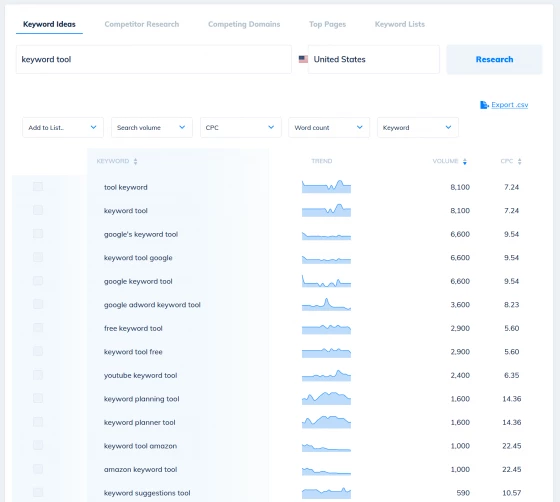
Search for keywords relevant to your core terms using our keyword explorer.
Discover thousands of unique new terms from our database of billions of keywords, all with monthly search volumes, cost per click and trend data. Explore the search volumes of over 180 countries and language combinations.
Create keyword lists to organize your research, or export to Excel to digest offline.
Topic Research & Analysis Tools
Create optimized content that outperforms the competition
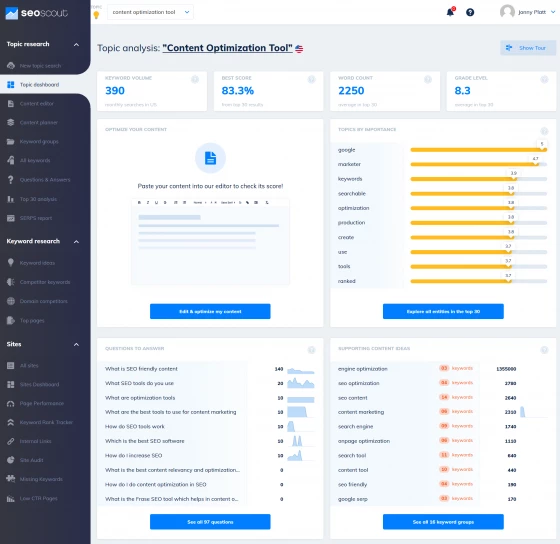
Dig deep into your niche using state of the art natural language processing . Let us analyze the top 30 results for your keywords, and score the most popular entities, topics and questions to help you plan detailed, rich and comprehensive content for fantastic user engagement.
Use our SEO editor to optimize your content for depth and readability, helping you produce content that outshines the competition and leaves your users with no questions unanswered - or use our Wordpress integrations to optimize where your writers feel most comfortable.
Explore a range of related content suggestions, from People Also Ask questions to groups of related keywords to create authoritative topic clusters around your chosen subject.
Competitor Keyword Finder + Research Tools
Steal your competitions top keywords and content ideas
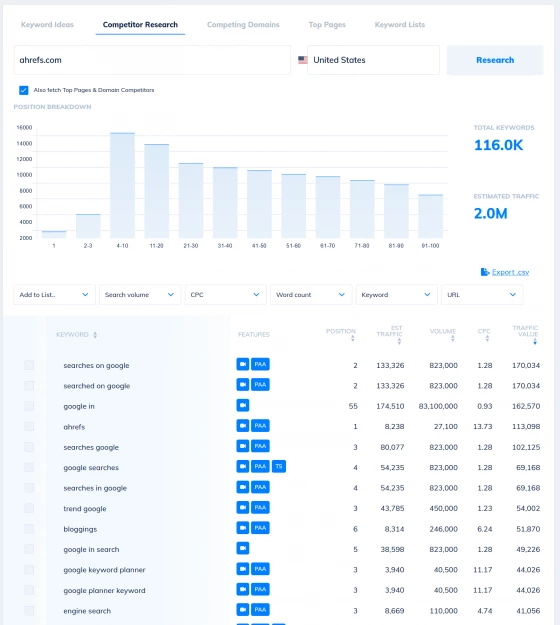
Want to know how much traffic your competitors are getting from search? Or to discover their top pages that bring them organic traffic, leads and sales?
Our competitive research and ana;usos tools help you discover just how well your competition rank. Dive into their keywords and steal their best ideas, then write articles to capture the search terms you've missed. Discover their best content and the long tail terms they rank for - then write better articles that outshine them.
Explore competing domains to find sites that overlap with your keywords - or your competitors - and start building a comprehensive content plan to dominate the search results.
Edit your content using our assistant & ensure your article covers all the entities and topics Google expects you to include.
Discover the questions your customers ask, with over 200 FAQs pulled from People Also Ask, Quora and Google Suggest

Free Google Autocomplete Tool
If you're looking for content ideas or a whole new set of synonyms and modifiers to add to your articles Scout Suggest is for you. We've already helped 10s of thousands of search marketers find unique keyword ideas for their SEO campaigns
Simply choose your language and location, enter your keywords to quickly generate 1000s of related terms, questions and phrases related to your terms!
Quickly group and categorize your keywords
Overwhelmed by all the options? To make your life simpler we use N-grams to quickly group suggests keywords into clusters that might form the inspiration for a new article or content piece.
This way you can quickly see where a group has a wide range of long tail variations you can include in your article content to maximize its search visibility.
How are the suggestions generated?
We use Google's Autocomplete system to get the most popular keywords suggested by Google.
By combining your focus keyword with a range of modifiers we can tease out unique long tail keywords that make for excellent article ideas based on your terms, helping your power past your competitors positions in the SERPs.
For example, prefixing question words such as 'where' can show new phrases that searchers are typing into Google. Comparison words such as 'vs' can help you find super specific buyer keywords that may have low volume but high buyer intent.
Answering searcher's questions in a clear and direct way makes it much easier to rank for your target topics and a huge number of related keywords.
Can I see the keyword's monthly search volume?
Having been an independent search marketer my whole life I know how expensive tools can be. I wanted to keep this tool free to ensure people at any stage in their career can get value from it.
Unfortunately keyword metrics such as monthly organic search volume and CPC cost money so I won't be adding those features to this keyword generator tool, but if you need a service that does then please check out our paid keyword research suite.
That said, it is worth asking if you really need that data? We know any keyword that appears in Google's suggestions has at least some search volume. Keyword suggestions are only listed by Google if they are searched fairly regularly each month.
Many tools use cached data for volume that can miss trending topics that only appear in Google Trends or Autocomplete Suggestions. Sample sizes are also small for many niches so a 'low volume' keyword can often bring a surprising amount of traffic.
For many valuable terms, such as in finance or B2B (business to business) most keywords are very low volume. Yet the value of a customer is so high it is often still worth writing articles to cover '10 search per month' but highly relevant keywords.
Not only are they are frequently less competitive, helping you to rank in a top position, but if those visitors are CEOs interested in your tool, you have the ability to make more sales.
Is this tool an alternative to Ubersuggest or Answer The Public?
When building this tool I wanted to achieve two things: to discover alternative keywords that simply wouldn't be highlighted by other tools, and to make managing those keywords easier.
Each 'suggestion' from Google contains a maximum of 25 keywords. If we simply add the letters of the alphabet to your keyword that's a maximum of 25*25=625 keywords. Not many, and it's also likely your competition are using the exact same list.
But if we get creative with prepositions, comparitative terms and question keywords we can generate thousands of phrases you simply wouldn't find on these other services. Many of these results trigger great suggestions and ideas for article titles. These resulting phrases can also suggest entire new categories of content you may not have considered otherwise.
I also wanted it to be simpler to manage your keyword lists. By automatically grouping similar keywords into clusters we can help you reduce duplicates and see a clear list of article ideas, along with synonyms and modifiers you may wish to use in each post.
How can I use these queries to improve my website's performance?
Generally, most marketers will use a keyword suggestion tool like this to stimulate ideas for new content.
By adding new pages to your site that cover a wider range of information you have the potential of ranking for many more long tail search phrases.
Search engines like to feature websites that include plenty of original, quality content. By writing more guides, analysis and advice on your niche you increase your overall relevance, which can make your entire site perform better in organic search.
You can also use the suggestions from our keyword generator to discover new modifiers and synonyms to use in your copy. If you have a page that is already ranked high in an engine like Google, Bing or Youtube then adding more suggested keywords to your title, sub headings or article body could get you much higher rankings for your site or your clients digital marketing campaigns.
In addition, as anyone working in search engine optimization will know, content optimization is a very powerful tool, yet to really succeed you will also need some backlinks. By lightly sprinkling a variety of the long tail phrases you've discoveed into your anchor text when link building you can see considerable gains. But don't be too aggressive - over optimizing your anchor text can lead to some painful alorithimc filters and penalties.
Does this free keyword suggestion tool support different languages and countries?
Absolutely. By default we show results from the United States, but if you'd like something else you simply need to set the country you wish to check suggestions for, and change the settings to your language as needed before you start. We've translated our modifiers into a wide range of different countries and locales but if we've missed an important one to you please let us know!
Is this a useful alternative to Google's Keyword Planner for advertisers on Google Ads?
Absolutely. By
using a long tail keyword generator to find a wide range of keyword
phrases you can drive many more targeted users to your site. Whether
you're using Google Adwords Keyword Planner or another online advertising tool.
Creating ad groups around specific searches your customers are making can dramatically improve your ad performance, as highly relevant ads can improve your quality score and click through rates. By avoiding the high competition keywords you can also help bring down your cost per click.
Where else can I find untapped keyword ideas?
If you want to dig deeper into the mysterious world of long tail marketing strategies, there's a ton of other places you can find amazing niche keywords. A great place to start is your own Search Console account, which can hold a wealth of awesome keywords and phrases you wouldn't see elsewhere. We have built amazing tools and reports to analyze your average google positions and show unique insights and opportunities to improve your content and claim additional keywords.
We also offer topic research tools, helping you dig deep and find all the related topics and entities discussed in your niche and competing webpages. Often the entities and subtopics can throw up many more important terms you may have overlooked before. Not only does writing content with these in mind help build your topical authority, but the combinations and overlaps between related terms can generate even more long tail potential.
Competition analysis tools can help you dig into the content and keywords that are driving results for your competitor's sites. Take inspiration from them and write an even better piece to steal their favourite keywords
How To Guides
- How To Find and Rank for Long Tail Keywords: SEO Guide
- How To Use SEO Scout for SERP Analysis
- How to find the FAQ keywords you can easily rank for
- How to Check a Site and See What Keywords it Ranks for: Competitor Research for SEO
- 'Page 2 Potential': How to Find Striking Distance Keywords to Rank Higher
- Discover question keywords and other low hanging fruit in your Search Console data to rank for easily
- How to steal your competitor's top keywords using the competitive research tool
- How to Fine-tune Your Content by Adding Missing Long-tail Keywords
- Find and Rank for Long Tail Keywords: SEO Guide
- How to optimise your content for topical relevance using SEO Scout's content grader
